During the initial setup of the platform, MaaS360 is integrated with your MS Entra ID environment.
The integration enables two enterprise applications, allowing the system to process authentication requests during enrolment and to pull the user directory and any required group memberships.
User groups allow us to target profiles and application distributions to required groups of users easily.
The diagram below shows IBM MaaS360 interactions with these applications.
Authentication Workflow | Description | Security implications |
Native IBM MaaS360 | Using the out-of-box workflow, IBM MaaS360 presents the users with its internal username and password prompts. Users remain inside the MaaS360 interface.
No MFA or additional account setup options are required, which could make enrolment easier.
All requests will be via the Azure Enterprise application “Maas360 Azure User Authentication” | Authentication requests are made by IBM MaaS360 servers based in India.
This can cause geolocation conditional access rules to block the authentication request. |
MS Entra ID | In this case IBM MaaS360 re-directs your authentication requests to the normal browser-based process. This is the same process as if you were logging into Office.com.
After the initial IBM MaaS360 email address prompt, the workflow opens the browser to complete the authentication process and returns to MaaS360. | Authentication requests are made directly by the browser.
Assuming the device is being enrolled in New Zealand, the location is reported as being in NZ.
NOTE: 1. If this is the first time the user has accessed their account, they will be prompted to complete the account setup as per normal. 2. MFA rules are honored when using this method. |
To review and confirm enrollment requests are being blocked you may complete the following:
If geolocation rules are in place and the IBM MaaS360 authentication workflow is used. Then the following 3 IP addresses must be configured as Named Locations in Azure.
The steps to configure these are:
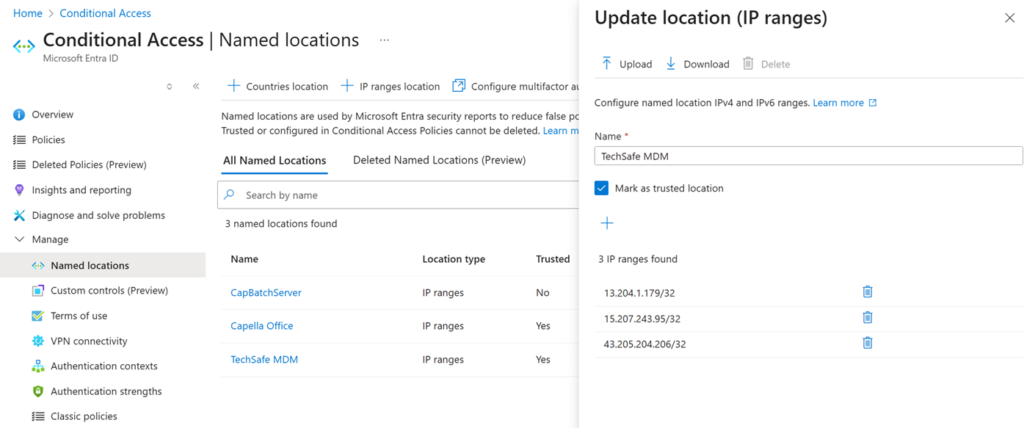
The previous named locations, prior to 14/12/2025 for reference were:
Info@techsafe.nz
04 382 8096
Level 1
166 Featherston Street
Wellington Central
Wellington 6011
New Zealand
© 2025 techsafe.nz | All Rights Reserved